3.5.
 The
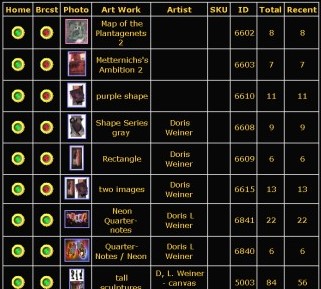
portfolio is used to see the status of all the described artworks. The
portfolio is used to see the status of all the described artworks.
When you go to your portfolio you will see a list of all the artworks
showing a small picture for each one. Lick on the picture to edit
the artwork description.
The dots to the left of the picture show where the artwork can be
seen. It "Home" is green it can be seen on the your exhibitor
web site. If "Brcst" is green then the artwork is broadcast
for full Internet exposure.
The "Art Work" column is the artwork name.
The "Artist" column is the artist name. This column is
what is sorted first. First the last name, then the first name then
the "Art Work" column.
The "SQU" Column is the SKU ID that you specified. Again
this is used if you already have a way of tracking your art.
The "ID" Column is used by our system. This number is
unique and does show up on the artwork detailed view so you can
use it to refer to the artwork when working with a perspective buyer.
The "Total" and "Recent" columns are showing
you how many times these artworks have been viewed. When you click
the "Reset Artwork Counters" it will reset all "Recent"
counters to 0. This allows you to track what types of art people
are looking at.
|