|
 Now
that your account is set up you will want to put the photos into
your account. When you go to Internet-Art-Marketing enter your account
User ID and Password to log in. Now
that your account is set up you will want to put the photos into
your account. When you go to Internet-Art-Marketing enter your account
User ID and Password to log in.
Adding artwork to your account is an instant process. Once dropped
your artwork is automatically converted to JPG format, resized and
placed in your studio.
Note if you are using a MAC based system you must email the artwork
to support@internet-art-marketing.com . Please specify the account
to put the artwork in and we will email you a confirmation when
it is in your account (usually within 24 hours).
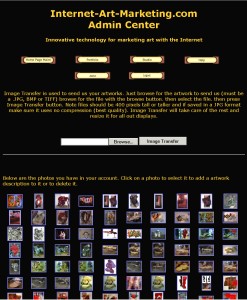
Then click on the STUDIO button to go to your studio. Click on the
BROWSE button to open a CHOOSE FILE window. Browse your computer
to select an image to transfer to your account and hit OPEN. This
will put the file name in the window. Now click on the IMAGE TRANSFER
button. In a few minutes the system will refresh the screen and
the new image will be in the top left corner of the grid of images
below.
For more information see Navigating
Internet-Art-Marketing / Studio / Dropping Images
|