|
 There
are a few types of artwork displays. Some are automatically generated
such as the portfolio and the gallery display. These are showing
the artwork from the newest to oldest, you have no control over
the order of what is displayed. The other type is where you have
control of what art is shown and the order. These displays are used
on the Welcome page, Special Exhibitions, artist Biography. There
are a few types of artwork displays. Some are automatically generated
such as the portfolio and the gallery display. These are showing
the artwork from the newest to oldest, you have no control over
the order of what is displayed. The other type is where you have
control of what art is shown and the order. These displays are used
on the Welcome page, Special Exhibitions, artist Biography.
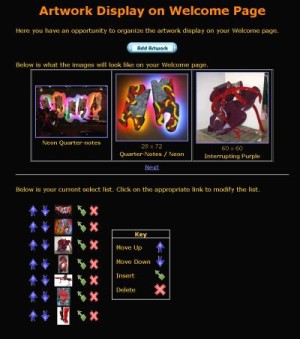
For ARTWORK DISPLAY's where you can control the order of what artworks
are displayed, you will have to select the artwork to be displayed.
The display starts out without any artwork in it. The first thing
to do is press the "ADD ARTWORK" button. This brings up
a SELECTION GRID of all your artwork, in order of newest artwork
in the upper left corner. When you move your mouse over the artwork
it will show you its name.
For all ARTWORK DISPLAY's you can set the "Image Grid Pattern".
These attributes are used to control the shape of the grid, the
artwork attributes displayed and the size of the thumbnail used.
To select the size of the thumbnail used set the "Photo Size"
attribute. The available sizes are Large, Medium, Small and Micro.
The "Enable Artist Name", "Enable Image Title",
"Enable Description" and "Enable Size" are other
artwork attributes that can be enabled to be displayed if they exist.
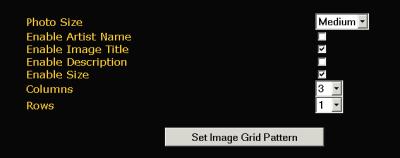 "Columns"
and "Rows" control the grid shape. If more artwork is
selected to be displayed (and for the automatically filled ARTWORK
DISPLAY) then a Prev/Next link is shown to see the rest of the collection.
When selecting Row, Column and Photo Size you will want to consider
what other browsers and computer screens are like. Beware if you
are on a large monitor at a high resolution that the average user
is not. Typically the average user uses an 800 x 600 screen or a
1024 x 768 screen. This means a small grid can fit 5 columns by
3 rows or medium grid 2 columns by 2 rows or a single large photo. "Columns"
and "Rows" control the grid shape. If more artwork is
selected to be displayed (and for the automatically filled ARTWORK
DISPLAY) then a Prev/Next link is shown to see the rest of the collection.
When selecting Row, Column and Photo Size you will want to consider
what other browsers and computer screens are like. Beware if you
are on a large monitor at a high resolution that the average user
is not. Typically the average user uses an 800 x 600 screen or a
1024 x 768 screen. This means a small grid can fit 5 columns by
3 rows or medium grid 2 columns by 2 rows or a single large photo.
The SET IMAGE GRID PATTERN button must be pressed for the Artwork
Display parameters to take effect.
|